CPQ billing software: the complete guide for B2B SaaS finance teams
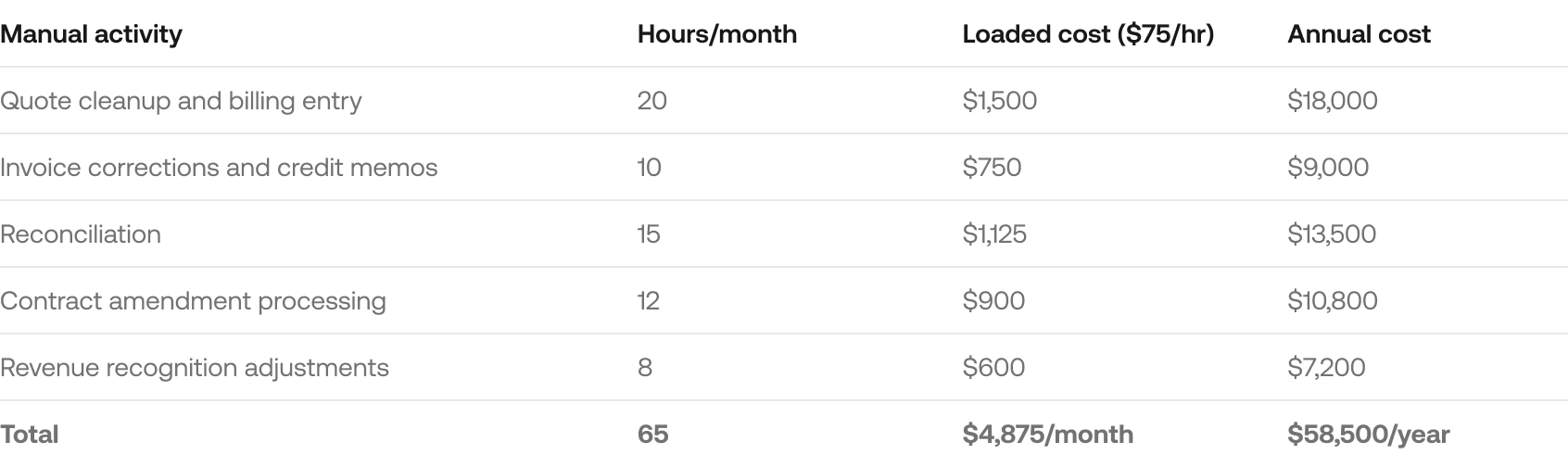
Manual reconciliation between quoting and billing costs $58K/year at a $5M ARR company. Here's how to evaluate CPQ billing software and pick the right architecture.
How to connect quoting, billing, and revenue recognition without manual reconciliation or stitching together five different tools.
Most B2B SaaS companies start the same way. Sales closes deals in a CRM. Finance manually recreates those deals in a billing tool. Someone maintains a spreadsheet for revenue recognition. And every month, the team spends days reconciling numbers that should match but don't.
The search for "cpq billing software" usually begins when that process breaks. Maybe it's a botched proration on a mid-term upgrade. Maybe it's a $12K discrepancy between your CRM and billing system right before a board meeting. Maybe your controller just told you they spend 15 hours a week on manual data entry between systems.
Whatever the trigger, you're here because you know something needs to change. This guide will help you understand what CPQ billing software actually is, when you need it, how to evaluate it, and how to avoid the implementation mistakes that derail most teams.
What is CPQ billing software?
CPQ stands for Configure, Price, Quote. It's software that helps sales teams generate accurate quotes when pricing gets complicated. Think: bundled products, tiered discounts, approval workflows for non-standard terms, and contract amendments.
Billing software handles the other side. It automates invoicing, payment collection, and subscription lifecycle management. It turns a signed contract into recurring invoices and tracks what's been paid.
CPQ billing software attempts to combine these two functions. The theory is simple: if the system that generates the quote is the same system that creates the invoice, you eliminate the manual handoff between sales and finance. No re-entering data. No reconciliation. One source of truth.
The problem? This category is actually three different categories wearing a trench coat.
Why "CPQ billing software" is actually three different categories
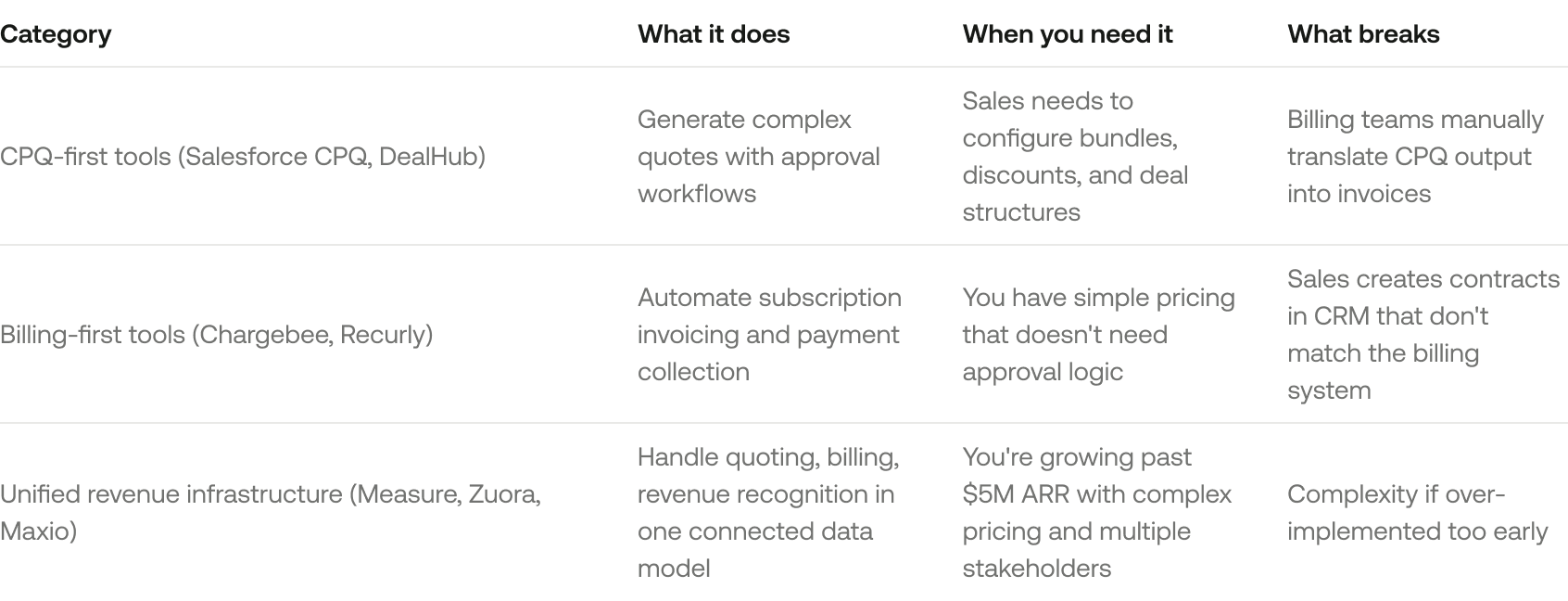
Here's where the confusion starts. When you search for CPQ billing software, you'll find three very different types of products:
Most companies don't need "CPQ billing software" as a category. They need revenue infrastructure that treats the entire flow from signed contract to recognized revenue as one system. Not duct-taped integrations.
The distinction matters because it changes what you should evaluate. If you buy a CPQ tool and a billing tool separately, you've just created the exact reconciliation problem you were trying to solve.
Why B2B SaaS companies search for CPQ billing software
The search for CPQ billing software usually starts when one of these scenarios breaks.
Scenario 1: sales closes a deal, then finance spends 3 hours fixing it
Sales closes a $50K annual deal. It includes a 20% discount, quarterly payment terms, Net 30 for the first invoice, Net 60 for the rest, and ramp pricing at $3K/month for Q1-Q2, ramping to $5K/month for Q3-Q4.
Sales enters this into Salesforce and marks the deal "Closed Won."
Finance receives a notification. Now they have to manually create a subscription in the billing system, calculate each quarterly invoice amount, set up different payment terms per invoice, create a revenue recognition schedule, and update commission records.
That's 3 hours of manual work for one deal. Multiply that by 20 deals a month, and you've got a full-time employee doing nothing but translating CRM data into billing data.
What actually breaks: manual work creates human error. The invoice doesn't match the contract. The customer disputes the charge. Sales gets paid the wrong commission. And nobody trusts the numbers.
Scenario 2: a customer wants to upgrade mid-term, and nobody knows the math
Customer signed a $12K/year annual prepay plan on January 1. On July 1, they want to upgrade to the $24K/year plan.
Simple enough, right? Except now someone needs to answer five questions at once: Do you prorate the remaining six months? Do you issue a credit for unused portion? Do you co-term with the original renewal date or create a new anniversary? How does this affect revenue recognition? What invoice do you send right now?
Sales quotes one number. Finance bills another. The customer sees a third number on the invoice. Everyone argues about who's right, and the customer loses confidence in your operations.
Scenario 3: renewals are coming, but the CRM and billing system disagree on contract value
CRM shows a customer is worth $60K ARR. Billing system shows they're paying $48K ARR. The difference: a mid-term discount was applied in the billing tool but never logged in the CRM.
Now your renewal forecast is off by $12K per customer. Scale that across 50 accounts, and RevOps is scrambling to reconcile a month before the board meeting.
If you're manually reconciling CPQ output with billing input, you don't have a software problem. You have an architecture problem.
What actually matters when evaluating CPQ billing software
Most CPQ and billing vendors list the same 50 features. Here's what actually determines whether the system works for your team.
1. One data model for contracts, billing, and revenue recognition
This is the single most important thing to evaluate. If CPQ writes to one database, billing reads from another, and rev rec pulls from a third, you'll spend 20+ hours a month reconciling. Guaranteed.
What you need: one source of truth where the quote, the subscription, the invoice, and the rev rec schedule all live in the same data model. When a sales rep approves a deal, the billing subscription and revenue schedule should create automatically. When a customer amends their contract, the billing schedule and revenue schedule should update automatically.
Red flags to watch for:
Vendor says "we integrate with [billing tool]" but can't show you the data mapping
Implementation requires middleware or custom scripts to sync data between modules
Changes to contracts require manual updates in multiple systems
How many systems does it take to turn a signed contract into an invoice? If the answer is more than one, you're paying the billing stack tax.
2. Subscription complexity handling (not just "recurring billing")
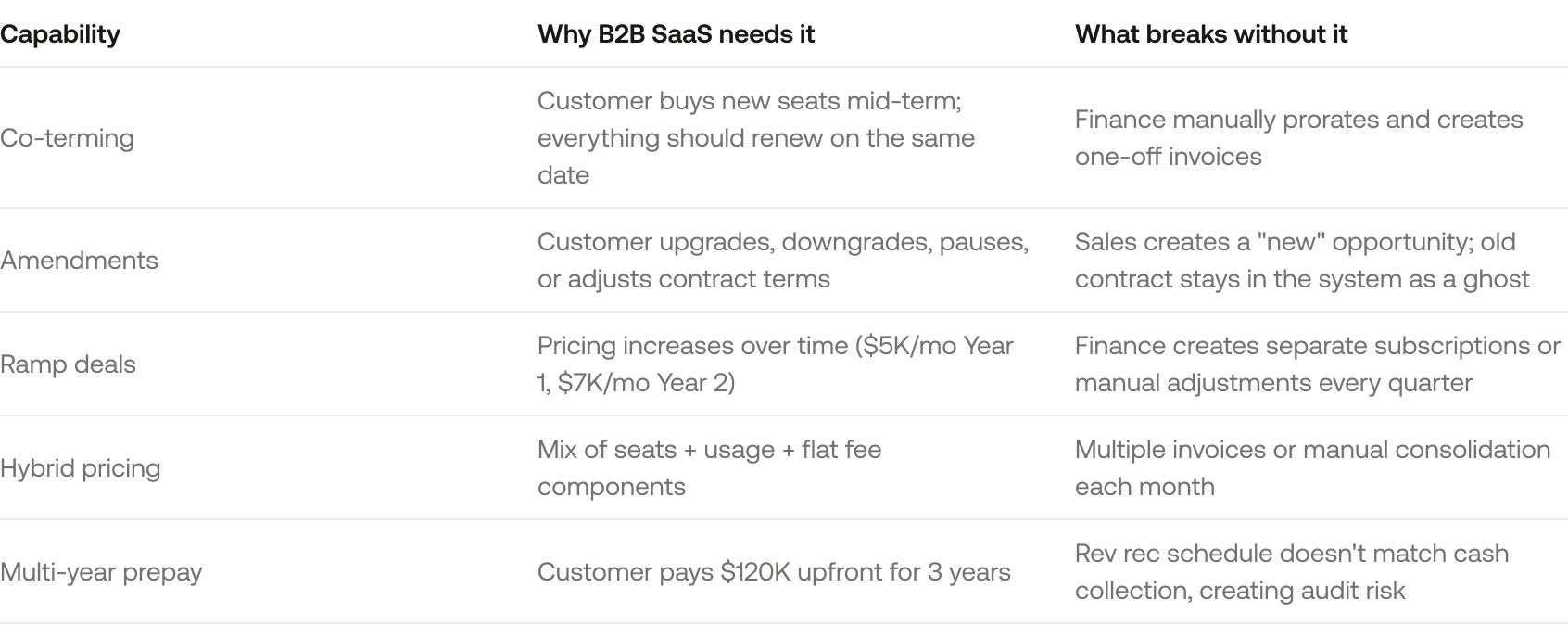
Most billing tools say they handle subscriptions. What they actually mean is "we can charge the same amount every month." Here's what B2B SaaS companies actually need:
Companies handling five or more amendment types per quarter typically spend 15+ hours a month on manual billing reconciliation. That's not a productivity inconvenience. It's a structural cost that grows with every deal you close.
3. Approval workflow and discount governance
Without approval controls, sales teams will over-discount or create pricing exceptions that finance can't support. You need tiered approvals based on deal size, discount level, payment terms, and custom clauses.
What to evaluate: Can you set discount thresholds that auto-escalate? For example, 10-15% triggers manager approval, 15-20% triggers VP approval, and 20%+ requires the CFO. Can you block non-standard payment terms unless finance signs off? Can you see a history of who approved what, and when?
Red flag: if approvals happen via Slack or email instead of inside the system with an audit trail, you'll have no record when your auditor asks.
4. Implementation complexity and time to value
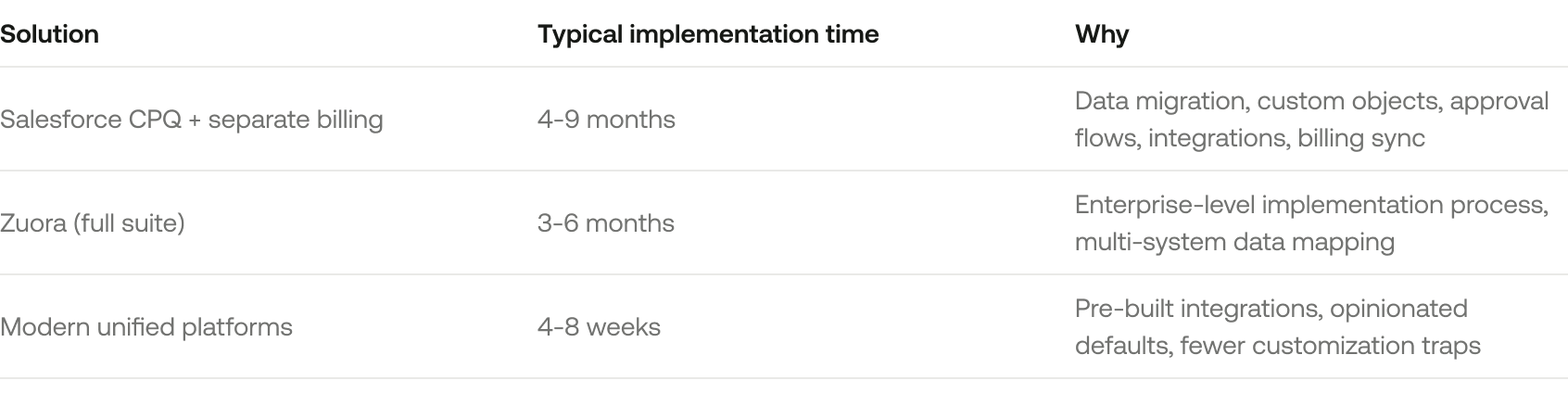
This is where most evaluations go wrong. Teams pick the most feature-rich tool, then spend six months implementing it.
Questions to ask every vendor: "Show me your implementation checklist and who on our team needs to be involved." "What's the longest implementation you've done, and why did it take that long?" "What's included in your quoted price versus what requires professional services?"
Implementation overruns typically cost 10-20% more than quoted, mostly because of unanticipated data migration and workflow redesign. Understanding why implementations take so long helps you avoid the common traps.
Should you buy CPQ and billing separately or use a unified platform?
This is the actual decision most finance and RevOps teams are trying to make. And it depends entirely on where you are.
When separate tools make sense
You might be fine with CPQ and billing as separate tools if you're under $3M ARR and have simple, consistent pricing. Your sales cycles are short (under 30 days) and don't require multi-level approvals. You have fewer than five pricing SKUs. You rarely do amendments, upgrades, or mid-term changes.
In that world, a stack like HubSpot + PandaDoc + Stripe Billing works fine. It's fast to set up and cheap to run.
But here's what breaks as you scale: sales starts negotiating custom terms that your CRM quotes can't represent. You add usage-based pricing, and your billing tool and CRM calculate different amounts. You hire more reps and get inconsistent quoting across the team.
When you need unified infrastructure
You need a unified system if you're doing $5M+ ARR with plans to double in 18 months. If you have hybrid pricing models. If sales negotiates custom terms on 40%+ of deals. If you process 10+ amendments a month. If finance spends more than 5 hours a week reconciling CRM versus billing data. If you're fundraising or preparing for audit and need clean revenue data.
The architecture difference looks like this:
Point solution architecture: Contract in CRM. Manual export. Spreadsheet cleanup. Manual import into billing. Manual export. Another spreadsheet for rev rec. Every arrow in that chain is a manual step or a fragile integration that breaks silently.
Unified architecture: Contract creates subscription creates invoice creates payment creates rev rec schedule. One data model. One workflow. One source of truth. When something changes, it propagates automatically.
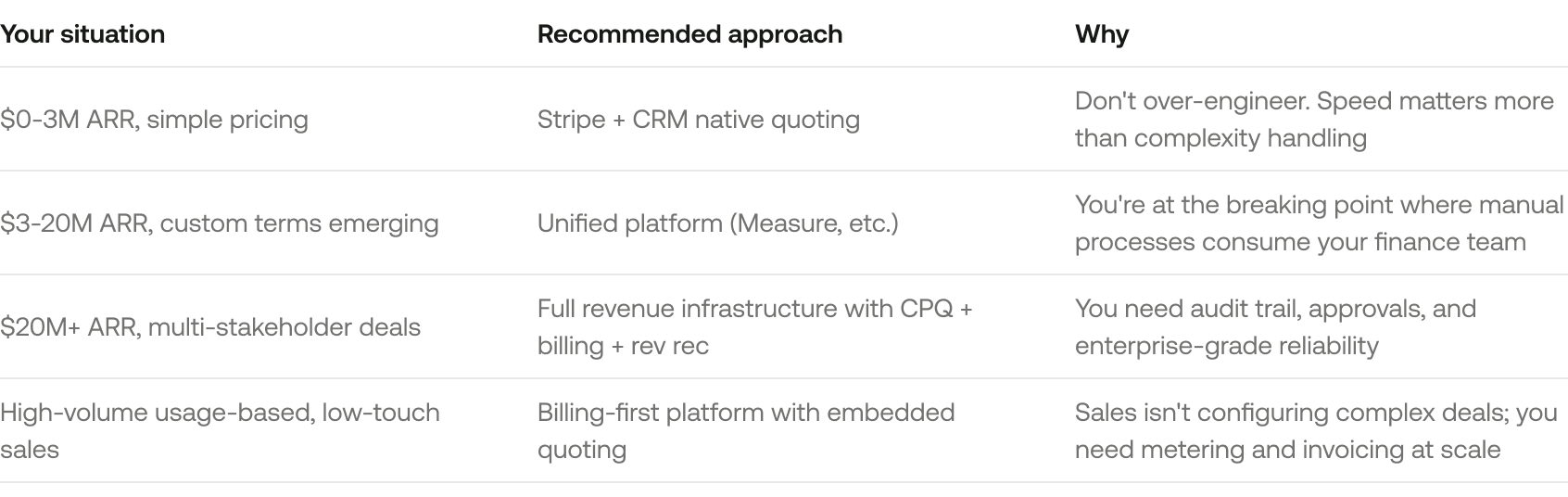
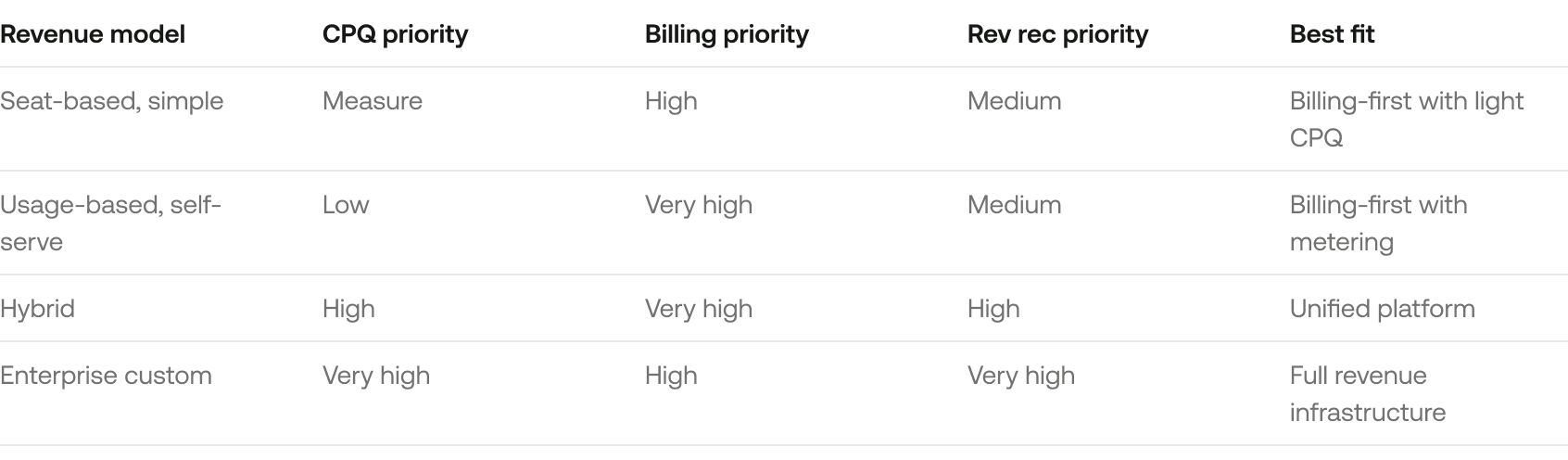
The decision matrix
This is the framework to anchor on. We'll reference it again later when discussing revenue models, but this is the core segmentation.
Most finance teams don't realize they've hit the breaking point until they've already wasted six months on manual reconciliation. If you're doing more than 3 hours a week of "quote cleanup," you've already passed the threshold.
Implementation best practices (what the top 10% of teams do differently)
Most CPQ billing implementations fail not because of the software, but because of process design, data quality, and change management.
Phase 1: audit your current process (weeks 1-2)
Before you touch any software, map every step from "prospect asks for pricing" to "invoice is paid and revenue is recognized." Identify every manual handoff. Document all pricing SKUs, bundles, discount policies, and approval thresholds.
Interview each stakeholder: sales, sales ops, RevOps, finance, billing, legal. Collect sample contracts that represent your five most common deal structures. The output is a process map showing exactly where bottlenecks, errors, and manual work occur.
This step feels tedious. It's the single most important thing you'll do.
Phase 2: define your product catalog and pricing architecture (weeks 3-4)
Your catalog is the foundation of both CPQ and billing. If SKUs are inconsistent, CPQ can't configure correctly and billing can't invoice correctly.
Key decisions to make: How many base products do you have? How many add-ons or modules? Are these sold as bundles or individually? What are your pricing dimensions (seats, usage, tiers, flat fee)? How do discounts work? What are your standard payment terms?
Clean up your catalog before implementation. Consolidate duplicate SKUs, standardize naming, archive retired products. Migrating ten years of messy data into a new system just gives you a shiny new system full of garbage.
Phase 3: configure rules, approvals, and billing logic (weeks 5-8)
Work in priority order. Week 5: set up base pricing and SKUs. Week 6: build approval workflows for discount thresholds, payment term exceptions, and deal size escalations. Week 7: configure billing rules for proration, co-terming, amendments, and renewal triggers. Week 8: map revenue recognition settings for ASC 606 compliance and deferred revenue tracking.
If your vendor can't demonstrate steps 7 and 8 in their demo, implementation will take three times longer than quoted.
Phase 4: pilot with 3-5 deals before full rollout (weeks 9-10)
Select deals that represent different complexity levels: a simple annual prepay, a monthly subscription with add-ons, a multi-year deal with ramp pricing, a usage-based component, and an amendment or upgrade.
Run these deals through the new system in parallel with your old process. Compare outputs. Does the quote match the invoice? Does the invoice match rev rec?
Success criteria: zero manual adjustments needed for at least three of five pilot deals, less than 30 minutes of setup time per deal, and sales reps can complete the workflow without help from finance.
Phase 5: train, roll out, and monitor (weeks 11-12)
Train each role separately. Sales reps need to know how to configure products, apply discounts, and submit for approval. Finance needs to monitor billing runs and handle exceptions. RevOps needs to track metrics and optimize.
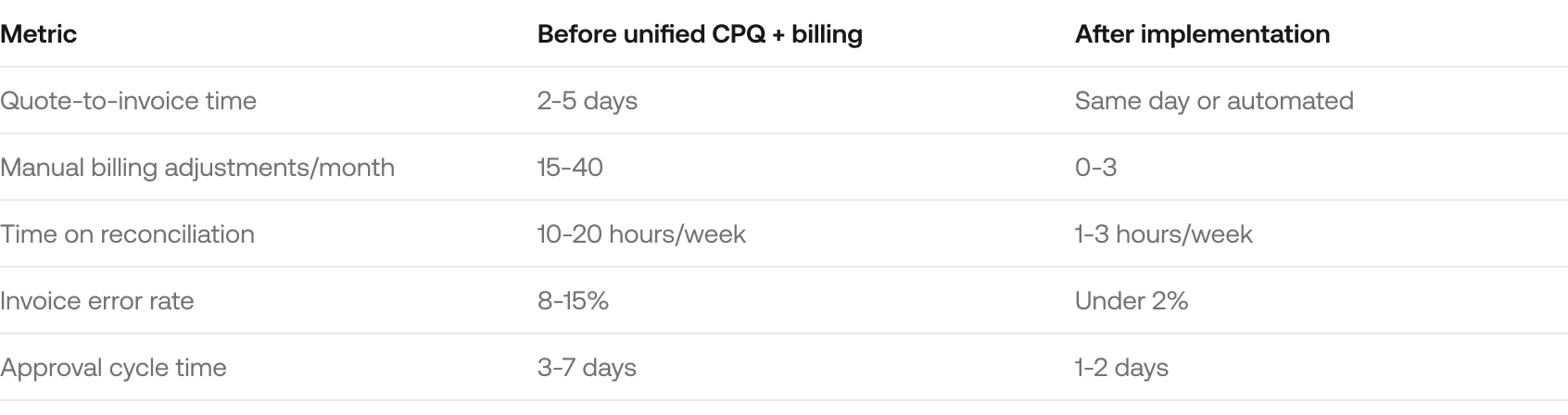
In the first 90 days, track these metrics: invoice accuracy rate (target 98%+), approval cycle time (should drop to 1-2 days), manual billing adjustments (should trend toward zero), and time spent on reconciliation (target 80% reduction).
What to measure: CPQ billing software ROI
Most content about CPQ billing software talks about features but never quantifies impact. Here's what actually changes when you get this right.
Operational efficiency metrics
Revenue impact metrics
The numbers that matter to your CFO: revenue leakage reduction of 2-5% of ARR recovered (from billing errors, missed renewals, and under-invoicing). Sales cycle reduction of 10-20% because reps spend less time on quote creation. Renewal rate improvement of 3-7% from automated renewal notifications. Deal size increase of 15-25% because reps can confidently configure upsells and bundles.
One real example: an $8M ARR B2B SaaS company implemented unified CPQ and billing, reduced finance close time from 12 days to 4, eliminated $60K/year in billing errors, and freed up 15 hours a week of finance capacity.
The hidden cost of doing nothing
If you're a $5M ARR company spending $58K a year on manual revenue operations, that's 1.2% of revenue just to administer your billing. That's a hidden tax on growth.
7 mistakes that sink CPQ billing implementations
Mistake 1: assuming CPQ will fix billing process problems
Company buys CPQ to "automate quoting." Then discovers the billing system can't accept CPQ output format. Now there's more integration work than before. Fix: map your entire flow from contract to cash before you evaluate software.
Mistake 2: over-customizing the configuration
Team tries to replicate every edge case and historical exception in CPQ rules. Configuration becomes so complex only one person understands it. System becomes unmaintainable. Fix: start with the 80/20 rule. Configure for your five most common deal types. Handle true edge cases manually for now.
Mistake 3: implementing without sales buy-in
Finance and RevOps design the system. Sales finds it clunky. Reps bypass it and keep using spreadsheets. Fix: include 2-3 sales reps in the design process. Pilot with friendly reps who'll give honest feedback. Show them how CPQ saves their time.
Mistake 4: not cleaning up the product catalog first
Migrate 10 years of messy SKUs into the new system. CPQ inherits inconsistent naming, duplicate products, and retired items. Reps can't find anything. Fix: audit and clean your catalog before implementation. Consolidate, standardize, archive.
Mistake 5: underestimating change management
Software is implemented correctly. Nobody knows how to use it. Old processes continue in parallel. Fix: train every user role separately. Create quick-reference guides. Monitor adoption weekly for the first 90 days.
Mistake 6: choosing software based on features, not data model
Vendor demo looks impressive. Six months in, data doesn't sync cleanly. Finance is still doing manual reconciliation. Fix: ask the vendor to show you how a quote becomes a subscription becomes an invoice becomes a rev rec entry. Request the underlying data model and API docs. Test a real deal during proof-of-concept.
Mistake 7: not planning for amendments and subscription changes
CPQ handles initial quotes well. Customer wants to upgrade mid-term. Nobody knows how to process it. Fix: during implementation, configure your five most common amendment scenarios. Document the workflow for upgrades, downgrades, pauses, and add-ons. Train both sales and finance.
The 12 questions every finance leader should ask during CPQ billing software demos
Vendor demos focus on features. You need to focus on data, workflows, and what happens when things change.
Data model and integration questions
"Show me how a quote becomes a subscription in your system. Is it one object or two?" You're testing whether the system has a unified data model or requires syncing.
"If a sales rep changes a deal after it's closed, what happens to the invoice and revenue schedule?" You're testing amendment handling and data consistency.
"How does your system handle co-terming when a customer adds seats mid-term?" You're testing proration logic and subscription change management.
"Can you show me theAPI documentationfor how billing data syncs to our accounting system?" You're testing integration complexity.
Subscription and billing logic questions
"Walk me through a customer with annual prepay plus monthly usage overages. How is that invoiced and recognized?" You're testing hybrid pricing support.
"What happens if a customer pauses for 3 months then resumes?" You're testing subscription lifecycle flexibility.
"How do you handle multi-year ramp pricing?" You're testing complex term support.
Approval and governance questions
"Show me tiered discount approvals based on deal size and discount percentage." You're testing workflow flexibility.
"Where is the audit trail for all approvals, price changes, and amendments?" You're testing compliance readiness.
Implementation and support questions
"What's included versus what requires professional services?" You're testing true cost.
"Show me your implementation project plan and the hours required from our team." You're testing internal resource requirements.
"What's the most complex implementation you've done, and how long did it take?" You're testing vendor honesty.
Which CPQ billing approach fits your revenue model?
Not all B2B SaaS businesses need the same architecture. Here's how to match the solution to your model.
Seat-based subscription
If you're like Slack or Zoom, your complexity comes from mid-term seat additions, annual versus monthly options, volume discounts, and true-ups at renewal. You need proration for mid-term changes, co-terming logic, and ideally a self-service portal for customers to add seats. A unified billing platform with embedded CPQ works well here.
Usage-based pricing
If you're like Twilio or AWS, you need metering infrastructure, a usage aggregation and rating engine, flexible invoicing for variable amounts, and revenue recognition that handles variable consideration. CPQ may not even be necessary unless sales negotiates custom rates. Go billing-first with metering.
Hybrid models (seats plus usage)
Example: base platform fee of $10K/year plus $50 per additional user over 100 plus $0.10 per API call over 1M calls/month. This is where point solutions break. You need a system that handles multiple pricing components in one contract, splits fixed and variable consideration for rev rec, and generates a single unified invoice. Unified revenue infrastructure is the only architecture that works here.
Enterprise deals with custom terms
Multi-year contracts, ramp pricing, custom payment schedules, professional services bundled with software, multi-entity billing. You need CPQ with flexible configuration, approval workflows, amendment handling, and ASC 606-compliant revenue recognition. This requires full revenue infrastructure.
Where CPQ billing software is headed
AI-native revenue automation
AI agents are starting to handle routine billing tasks, exception resolution, and revenue recognition decisions. Natural language interfaces for configuring quotes are emerging. This only works if the underlying data is structured and clean. Prioritize vendors with a strong data model over vendors who bolt AI onto messy architecture.
The death of integration hell
Modern platforms are building full revenue stacks instead of requiring you to stitch together five point solutions. Embedded payments, collections, and dunning are becoming standard. Ask vendors: "What do I not need to buy separately?"
Self-service revenue operations
Customer portals for self-service upgrades, downgrades, and billing management reduce bottlenecks. Sales self-service for quote configuration without ops support reduces cycle time. If you're scaling to 50+ reps, prioritize platforms with strong self-service UX.
Revenue recognition as a first-class citizen
ASC 606 compliance is no longer an afterthought. Rev rec is being built into the core data model, not added via integration. If you're approaching a Series B or preparing for audit, native rev rec should be a requirement, not a nice-to-have.
The next generation of CPQ billing software won't just automate quoting. It will eliminate the entire reconciliation layer between sales, billing, and finance. That's the architecture Measure is building.
What comes next
If you've made it this far, you already know that stitching together separate CPQ and billing tools creates more problems than it solves. The real question is whether you keep paying the reconciliation tax or invest in infrastructure that connects contracts, billing, rev rec, and commissions in one system.
Measure was built for B2B SaaS companies between $3M and $20M ARR who need the power of enterprise revenue infrastructure without the 9-month implementation or the six-figure consulting bill. One connected system. One data model. Everything propagates automatically.
Book a demo and see how Measure turns your signed contracts into accurate invoices, recognized revenue, and correct commissions. Without the spreadsheets in between.
See it in action.
Billing and revenue automation that handles contracts, invoicing, revenue recognition, and commissions in one connected system. Book a demo to see how Measure works.