SaaS billing migration guide: a step-by-step playbook for B2B finance teams
Billing migrations break when treated as IT projects. This step-by-step guide covers data mapping, risk mitigation, rollback planning, and customer communication for B2B SaaS.
Your billing system touches every dollar of revenue your company recognizes. Every subscription, every invoice, every commission calculation, every month-end close. When you migrate billing platforms, you're not swapping software. You're performing surgery on your revenue infrastructure while the patient is still breathing.
This guide is for finance and RevOps leaders at fast growing ARR B2B SaaS companies who are about to switch billing platforms. Maybe you've already chosen your new system. Maybe you're still evaluating. Either way, you need a plan that accounts for the things that actually break during migration: MRR accuracy, ASC 606 continuity, integration stability, and customer trust.
Here's what this guide covers:
How to assess whether your team is actually ready to migrate
The five biggest risks and specific mitigation tactics for each
A complete data mapping framework (including the edge cases that will trip you up)
The step-by-step migration process with validation checkpoints
Customer communication templates you can copy and customize
Integration checklists for your CRM, accounting software, and payment processor
Realistic timelines by complexity tier
A rollback plan for when things go sideways
One grounding truth before we start: billing migration is a revenue operations project, not an IT project. The companies that treat it as a data export exercise are the ones that spend three months reconciling spreadsheets after go-live.
Before you start: is your team actually ready to migrate?
Many companies start migrations before they understand what "done" means. They pick a go-live date, assign an engineer, and start exporting data. Six weeks later, they're stuck in a parallel run with no clear exit criteria, burning hours they didn't budget for.
Don't be that team. Before you touch your new system, answer three questions.
Define your migration success criteria
"It works" isn't a success criterion. Define what success actually looks like in measurable terms:
MRR in the new system matches the old system within $X (define your tolerance. For most companies at this stage, it should be zero discrepancy on active subscriptions).
Zero double-billing events during cutover.
All integrations (CRM, accounting, payment processor) passing data correctly within 48 hours of go-live.
First invoice cycle in the new system completes with no manual intervention beyond what's expected.
Finance team signs off on reconciliation before cutover. Not after.
The migration readiness checklist
Run this internal audit before you log into your new platform:
Current system documentation. Can you export every active contract term, pricing tier, custom deal, and billing cadence? If this information lives partially in spreadsheets or someone's head, that's your first problem to solve.
Data audit. Where does your billing data actually live? It's rarely in one place. Check your billing system, CRM, payment processor (Stripe, Braintree), spreadsheets, and any manual tracking your team maintains. If you aren't sure where the source of truth is for a given data point, you aren't ready to migrate.
Stakeholder alignment. Has your CFO or CEO explicitly signed off on the timeline, the team allocation, and the acceptable risk level? Migrations without executive sponsorship stall at the first hard decision.
Who needs to be in the room
Billing migrations fail when they're treated as a single-team project. Here's the responsible-accountable-consulted-informed (RACI) framework that works:
Finance (accountable). Owns data accuracy, reconciliation sign-off, and ASC 606 continuity. This is their project, even if engineering does the technical work.
RevOps (responsible for integrations). Owns the contract-to-cash flow and ensures data propagates correctly between systems.
Engineering (responsible for execution). Owns API connections, data extraction, and import scripts. Takes direction from finance on validation criteria.
Customer Success (consulted). Owns customer communication and monitors for billing-related churn signals.
Legal/Compliance (consulted). Validates that contract terms transfer correctly and revenue recognition remains compliant.
The 5 biggest risks in SaaS billing migration (and how to mitigate each)
Let's name the fears directly. These are the things that keep finance leaders up at night when a migration is on the roadmap.
Double-billing or under-billing active subscribers
What it is: A customer gets charged twice in the same billing period, or a billing cycle gets skipped entirely during cutover.
Why it happens: The old system fires a scheduled invoice before it's deactivated, while the new system also triggers billing on the migrated subscription. Or the cutover window overlaps with a billing cycle boundary.
Mitigation: Choose your cutover window at least 5 days away from any major billing cycle date. Deactivate billing in the old system before activating it in the new system. Never run both systems in active billing mode simultaneously unless you're using a controlled parallel run with billing suppressed on one side.
Broken integrations with CRM, accounting software, and payment processors
What it is: Data stops flowing between your billing system and Salesforce, your accounting tool, or Stripe after migration.
Why it happens: The new billing system uses different field names, different event triggers, or different data structures. Integrations that worked with the old system need reconfiguration, not just reconnection.
Mitigation: Map every integration touchpoint before migration. For each connected system, document: what data flows, in which direction, triggered by what event, and what breaks downstream if it stops. Test every integration in sandbox before production cutover.
Loss of historical invoice accuracy
What it is: After migration, you can't produce accurate historical invoices for audit, tax, or customer dispute purposes.
Why it happens: Teams migrate active subscriptions but skip historical invoice records, assuming they can "always go back to the old system." Then the old system contract expires or data gets archived.
Mitigation: Decide explicitly what happens to historical data. Either migrate it into the new system, export it to a permanent archive (data warehouse, PDF storage), or confirm you'll maintain read-only access to the old system for a defined period. Document this decision and get finance sign-off.
ASC 606 / revenue recognition continuity
What it is: Your revenue recognition schedule breaks during migration, creating compliance risk and potentially requiring restatement.
Why it happens: The new system doesn't automatically inherit performance obligation timelines from the old system. Deferred revenue balances don't transfer cleanly. Revenue schedules restart instead of continuing.
Mitigation: Export every open revenue recognition schedule from your old system before migration. Validate that the new system can import mid-schedule rev rec entries (not all platforms support this). If your new system handles native revenue recognition, confirm it can ingest historical obligation data. If not, maintain your old rev rec tool in parallel until all pre-migration contracts complete their recognition period.
Customer churn caused by billing confusion
What it is: Customers see an unfamiliar invoice, a different payment page, or a charge they don't recognize. They contact support. Or worse, they cancel.
Why it happens: Lack of proactive communication. Invoice formatting changes. Payment processor descriptor changes. Portal login URLs break.
Mitigation: Communicate proactively (templates below). Update payment descriptors in your new processor configuration to match what customers expect to see on their statements. Ensure customer-facing portal URLs redirect correctly. Brief your support team before cutover, not after.
Mapping your current billing data (the step everyone underestimates)
This is the unsexy work that makes or breaks your migration. Every billing migration pain point we've seen traces back to incomplete data mapping.
What data needs to migrate vs. what needs to be archived
Not everything moves to the new system. Here's the decision framework:
Must migrate (active data):
All active subscriptions with current terms, pricing, and billing cadence
Outstanding balances, credits, and prepayments
Payment method tokens (confirm your payment processor supports token portability)
Current dunning states and retry schedules
Migrate or archive (decision required):
Historical invoices (migrate if your new system supports it and you need in-app access; archive if PDF/data warehouse access is sufficient)
Closed/cancelled subscriptions (archive unless needed for reactivation workflows)
Failed payment history (archive; useful for analytics but rarely needed in active billing system)
Archive only:
Deprecated plan configurations
Test/sandbox data from old system
Legacy integration logs
Building your data inventory
Before you export anything, build a field-by-field mapping document. For every data point in your old system, define: the field name, where it maps in the new system, any transformation required, and who validates accuracy.
Critical fields to map:
Customer ID (and how it maps to your CRM record). Contract start and end dates. Billing cadence (monthly, quarterly, annual). Plan type and tier. Price overrides or custom pricing. Usage data (if applicable). Tax jurisdiction and exemption status. Payment method and processor customer ID. Outstanding credit balance. Deferred revenue schedule.
The edge cases that will break your migration
Standard subscriptions migrate easily. These don't:
Customers on deprecated plans. They're paying a price that doesn't exist in your new system's plan catalog. You need to either recreate the plan or use price overrides. Document every grandfathered customer individually.
Multi-year contracts mid-cycle. A customer signed a 3-year deal 14 months ago. Their billing schedule, prepayment, and rev rec schedule all need to transfer mid-stream. This requires careful manual validation.
Mid-year price changes. Customers whose pricing changed mid-contract period. Which price applies? What about prorations that were already calculated?
Enterprise customers with custom billing arrangements. Net-60 payment terms, custom invoice formats, purchase order requirements. These rarely map cleanly to standard system configurations.
Paused or suspended subscriptions. What's their state in the new system? Do they resume automatically? At what price?
If you handle complex SaaS pricing, multiply the number of edge cases you expect by three. That's closer to reality.
Choosing your migration approach
Big bang vs. phased migration
A big bang migration moves everything at once. One weekend, you're on the old system. Monday morning, you're on the new one. It's faster but riskier. If something breaks, everything breaks.
A phased migration moves customers in cohorts over weeks or months. It's slower but gives you time to catch and fix issues before they affect your entire customer base.
Choose big bang if: You have fewer than 200 customers, one pricing model, minimal custom deals, and strong engineering bandwidth for a concentrated sprint.
Choose phased if: You have 500+ customers, multiple pricing models, custom enterprise deals, or limited engineering time. This is the right approach for most companies at $3-10M ARR.
The phased approach in practice
Phase 1 (Week 1-2): New customers only go on the new system. Existing customers stay on the old system. This validates your new system's billing logic with zero risk to existing revenue.
Phase 2 (Week 3-6): Migrate active subscriptions on standard plans. Start with your simplest cohort: monthly customers on published pricing with no custom terms.
Phase 3 (Week 7-10): Migrate complex accounts. Custom pricing, annual prepayments, enterprise contracts. These get individual validation before cutover.
Phase 4 (Week 11-12): Archive historical data, confirm all reporting works in the new system, decommission the old system.
The parallel run approach
In a parallel run, both systems operate simultaneously. The old system continues to bill customers while the new system runs in shadow mode, generating invoices that don't get sent. You compare outputs for accuracy.
This works when: you have high-value contracts where any billing error is unacceptable, your finance team needs to validate the new system against real production data before trusting it, or your compliance requirements demand a documented validation period.
Run the parallel period for 1-2 billing cycles maximum. Longer than that and you're burning team bandwidth without gaining new information.
In-house vs. using a migration consultant
Handle it in-house if: You have a dedicated finance or RevOps person who can own the project for 8-16 weeks, your data is relatively clean, and your new billing platform offers implementation support.
Hire a consultant if: Your team is already at capacity, you have significant custom/enterprise billing complexity, or your timeline is compressed and failure isn't an option.
Be clear on what your new platform's professional services team actually delivers. Some vendors include full data migration in their implementation. Others hand you documentation and wish you luck. Ask before you sign.
The step-by-step SaaS billing migration process
This is the operational core. Follow these steps in sequence. Don't skip ahead.
Step 1: Configure and validate the new system before touching production data
Set up your new billing system completely before importing any customer data:
Create all plan configurations, pricing tiers, and add-ons
Configure tax rules and jurisdictions
Connect your payment processor and verify payment method token compatibility
Build and test integrations with your CRM and accounting software
Configure invoice templates, email notifications, and customer portal
Set up revenue recognition rules if your new system supports native rev rec
The goal: your new system should be able to bill a test customer correctly from signup through renewal before you bring over a single real account.
Step 2: Extract and clean your data
Export your data from the existing system using its native export tools or API. Don't rely on manual data entry for anything over 50 accounts.
Data cleaning rules:
Deduplicate customer records (especially if your CRM and billing system have different customer IDs)
Normalize date formats, currency codes, and plan names
Handle null fields explicitly (decide what the default should be, don't leave them blank)
Flag any records that don't match your new system's import schema
Ask your new platform for their import template before building your own export. Work backward from what they need, not forward from what your old system gives you.
Step 3: Sandbox testing with sample data
Migrate 10-20 representative accounts into your new system's sandbox environment. Choose a mix that represents your actual customer base:
3-5 standard monthly subscriptions
2-3 annual subscriptions (mid-cycle)
2-3 customers with custom pricing
1-2 customers with credits or outstanding balances
Plan and pricing match the customer's actual contract
Credits and balances transferred accurately
Your finance team lead reviews these results. Not just engineering. Finance catches discrepancies that engineers miss because they understand what the numbers should be.
Step 4: Reconciliation before go-live
This is your go/no-go gate. Before cutover, run a full reconciliation:
MRR match: Total MRR in old system equals total MRR in new system (to the dollar)
AR match: Outstanding accounts receivable balances match
Credit match: All customer credits and prepayment balances accounted for
Count match: Number of active subscriptions in new system matches old system
If any of these don't match, stop. Find the discrepancy. Fix it. Then re-run reconciliation.
No go-live without written finance sign-off on reconciliation. This is non-negotiable.
Step 5: Cutover planning
Choose your cutover window carefully. Avoid month-end, quarter-end, and any date where a significant portion of your customers have scheduled billing events.
The cutover sequence:
Freeze changes in old system (no new subscriptions, no plan changes)
Run final data export from old system
Import final cohort into new system
Run reconciliation one more time
Deactivate billing in old system
Activate billing in new system
Verify first automated actions trigger correctly (scheduled invoices, dunning, renewals)
Communicate internally 48 hours before cutover. Communicate to customers 7 days before (enterprise) or at cutover (standard). More on communication below.
Step 6: Post-migration validation (first 30 days)
The migration isn't done at cutover. It's done after the first full billing cycle runs clean.
Week 1: Audit every invoice generated in the new system. Compare amounts against expected values. Monitor failed payment rates. If failed payments spike above your historical baseline, investigate immediately. Your payment processor configuration may need adjustment.
Week 2: Verify integration health. Does subscription data flow correctly to your CRM? Do revenue entries post correctly in your accounting system? Are commission calculations triggering on the right billing events?
Week 3-4: Compare month-end close process against pre-migration baseline. Is it faster or harder? What manual steps remain? Document any recurring issues for your platform vendor to address.
If your month-end close doesn't improve within 60 days of migration, something in your new system's configuration needs attention.
Your customer communication playbook
Do you need to tell customers at all?
Here's the rule: if the migration changes anything the customer sees, you communicate. This includes invoice appearance, payment portal URL, payment processor descriptor on their credit card statement, or login credentials.
If nothing changes from the customer's perspective, you still tell enterprise accounts as a courtesy. They appreciate transparency, and their procurement teams may need updated vendor documentation.
What to communicate and when
T-30 days: Brief your customer success and support teams. Give them FAQ documents so they can answer questions without escalation.
T-7 days: Proactive outreach to enterprise and custom-contract customers. Personal email from their account manager, not a mass blast.
T-0 (cutover day): Brief notification to all customers. Short, factual, reassuring. Include a support contact for questions.
T+7 days: Follow-up only if customers reported issues. Don't send another mass email if things went smoothly.
Customer communication templates
Standard customer email:
Subject: Brief update to our billing system
Hi [Name],
We're updating the system we use to manage billing. This change takes effect on [date].
What this means for you: Your subscription, pricing, and payment method remain exactly the same. You may notice a slightly different invoice format. No action is needed on your end.
If you have any questions, reply to this email or contact [support email].
[Signature]
Enterprise customer email:
Subject: Billing system update. No action needed.
Hi [Name],
I wanted to give you a heads-up that we're migrating our billing infrastructure on [date]. Your contract terms, pricing, and payment arrangements are unchanged.
The only difference you'll notice is [specific change: invoice format / portal URL / payment descriptor]. Everything else remains the same.
If your finance or procurement team needs any documentation updated on their end, let me know and I'll provide whatever's needed.
[Account Manager Signature]
How to handle migration-related churn signals
If a customer contacts support about a billing issue post-migration, route it to their account manager immediately. These aren't product dissatisfaction signals. They're confusion signals. A quick personal response resolves 90% of them.
Track migration-related support tickets separately for the first 30 days. If ticket volume exceeds 5% of your active customer base, you have a communication gap that needs addressing.
Integration checklist: systems that break during billing migrations
The critical question: can your payment method tokens migrate to the new billing system without requiring customers to re-enter their card details?
If your new billing system connects to the same payment processor, tokens typically transfer. If you're switching processors, you may need to request token migration from your current processor (Stripe supports this via a formal process). Plan 2-4 weeks for processor-level token migration approvals.
Verify: webhook configurations, payment retry logic, and descriptor settings all need reconfiguration in the new system.
CRM (Salesforce, HubSpot)
Your CRM integration likely syncs subscription status, MRR values, and renewal dates from billing. After migration, verify:
Subscription records in CRM reflect data from the new system, not stale data from the old one
Renewal opportunity triggers fire correctly based on new system events
Any automated workflows that reference billing data (expansion alerts, churn risk scoring) still function
Accounting / ERP
This is where migrations get expensive if you get them wrong. Your accounting system receives revenue entries, invoice data, and payment records from billing.
Verify: chart of accounts mapping, tax code assignments, revenue recognition journal entries, and accounts receivable aging reports. Run a test month-end close with your accountant or controller to confirm everything posts correctly.
Data warehouse / BI tools
If your revenue metrics (MRR, ARR, churn, net revenue retention) pull from your billing system, those pipelines need updating. New system means new table structures, new field names, and potentially new event schemas.
Budget 1-2 weeks of analytics engineering time for pipeline reconfiguration. And plan for a brief period where historical trend data may show a gap at the migration boundary.
Commission / comp tools
If your commission tracking triggers off billing events (invoice paid, subscription created, renewal processed), confirm these triggers still fire correctly in the new system. Sales team trust erodes fast when commission payments are late or incorrect due to a billing change they had no control over.
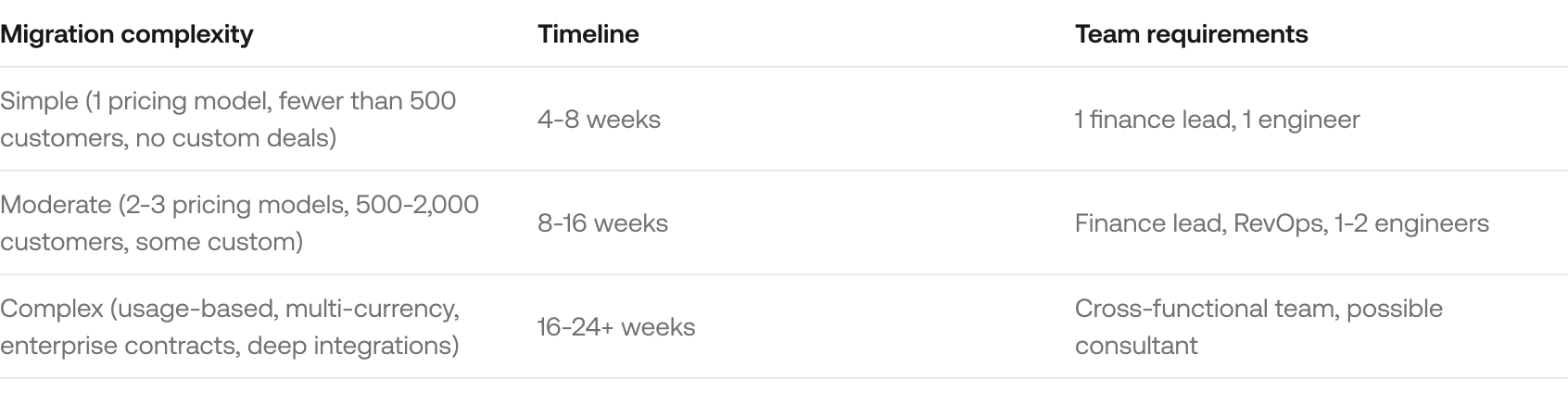
Realistic timeline: how long does a SaaS billing migration actually take?
Common reasons migrations take longer than expected
Data cleaning takes 2-3x longer than anyone budgets. Edge cases multiply once you start testing. Integration reconfiguration reveals dependencies nobody documented. The finance team needs more time for reconciliation than the project plan allowed. Key stakeholders go on vacation during critical decision points.
The hidden costs nobody budgets for
Beyond your new platform's subscription fee, budget for:
Team time: 15-25% of 1-3 people's capacity for 2-4 months
Consultant fees (if used): $15,000-$75,000 depending on complexity
Integration rebuilds: Engineering time for CRM, accounting, and analytics pipeline reconfiguration
Opportunity cost: Features not shipped, deals not closed, because your team is focused on migration
Parallel run costs: Running two billing systems simultaneously for 1-3 months means paying for both
Your billing stack has a total cost of ownership that extends well beyond the subscription line item.
Your rollback plan (what to do if something goes wrong)
Nobody wants to roll back. But not having a plan means your only option when things break is to panic. Define your rollback criteria before cutover, when thinking is clear and stakes feel abstract.
When to pull the rollback trigger
Define these thresholds in advance and get agreement from your migration team:
MRR discrepancy exceeds 2% after 48 hours with no identified cause
Failed payment rate exceeds 3x your historical baseline for 72+ hours
Any integration outage (CRM, accounting, payment processor) exceeding 24 hours with no vendor ETA
Double-billing affecting more than 5 customers with no automated prevention in place
If any of these criteria are met, you invoke the rollback plan. No debates, no "let's give it one more day."
What a rollback actually involves
Rolling back isn't as simple as "switching back to the old system." You need to account for:
Transactions that occurred in the new system between go-live and rollback decision. These need to be recorded, exported, and potentially replayed in the old system.
Customer payments already processed through the new system's processor configuration.
Any invoices sent from the new system that customers may have already paid or disputed.
Communication to customers explaining a billing delay (template below).
Internal rollback communication:
Team: We're invoking our rollback plan effective [time]. All billing reverts to [old system] immediately. [Finance lead] owns the reconciliation of any transactions that occurred in the new system. Customer communication goes out within 4 hours. Next check-in: [time].
External rollback communication (if customers are affected):
Subject: Brief billing delay. No action needed.
Hi [Name], You may experience a short delay in your next invoice as we finalize a system update. Your subscription and pricing are unaffected. If you have any charges or questions, please reach out to [support email].
How to minimize rollback risk
The parallel run approach dramatically reduces rollback risk because your old system never stops being the system of record until you're confident in the new one. Yes, it's more expensive and more work. But for companies where a billing disruption could trigger enterprise customer escalations or board-level questions, the insurance is worth it.
What to look for in your new billing system before you migrate
Before you commit to a migration, make sure your destination platform actually solves the problems that made you leave. Here are the six capabilities that matter most for B2B SaaS companies at $3-10M ARR.
The 6 capabilities that matter for your stage
1. Contract-to-billing automation. If your new system still requires manual contract data entry to generate invoices, you're building the same problem you're trying to escape. Look for a system where contract changes automatically propagate to billing.
2. Native revenue recognition. ASC 606 compliance bolted on via spreadsheet or a third-party tool is the single biggest source of month-end close pain. Your billing system should handle rev rec natively, connected to the same subscription data that generates invoices.
3. Support for your pricing model today and 18 months from now. If you're considering usage-based pricing or ramp pricing, your new platform needs to handle that without requiring another migration.
4. Integration depth with your existing stack. "We have a Salesforce connector" isn't sufficient. Ask: what data syncs, in which direction, how often, and what happens when it breaks? Confirm your payment processor, CRM, and accounting tool are supported with production-ready integrations.
5. Audit trail and historical data access. Every change to every subscription should be logged, timestamped, and attributable. This isn't a nice-to-have for finance teams. It's a requirement.
6. Team bandwidth required to operate it. Some billing platforms require a dedicated billing operations hire. At your stage, the system should work for your existing finance team without adding headcount. If the platform is too complex for your current team, it's the wrong platform.
Questions to ask every billing platform vendor before signing
What does your migration support actually include? Is data migration handled by your team, or do we own it entirely?
Who validates data accuracy during migration? Is there a shared reconciliation step?
What happens if we discover data integrity issues 30 days post-migration? What's your SLA for resolution?
How long until we're fully live? What's your average implementation timeline for companies at our stage and complexity?
Can we maintain API access to exported data from our old system through your platform, or do we need a separate archive?
Frequently asked questions
Does billing migration affect ASC 606 compliance?
It can if you don't plan for it. Revenue recognition schedules in progress need to transfer to your new system without resetting. Export all open rev rec schedules before migration and validate that deferred revenue balances match between systems. If your new platform handles native revenue recognition, confirm it can ingest mid-schedule obligations.
How do we migrate customers on grandfathered or deprecated pricing?
Create each grandfathered plan in your new system as an archived or hidden plan that's not available for new signups but correctly reflects the legacy customer's terms. Use price overrides if your new platform supports them. Document each grandfathered customer individually and validate their first invoice in the new system manually.
Can we migrate without any customer-facing downtime?
Yes, if you use a phased approach. New customers go on the new system immediately. Existing customers migrate in cohorts during off-cycle billing periods. The customer never experiences a gap in service or a missed invoice. They may notice cosmetic changes (invoice format, portal URL) but shouldn't experience functional disruption.
How do we validate MRR accuracy after migration?
Run a full reconciliation comparing total MRR, MRR by plan tier, and MRR by customer between your old and new systems. Match to the dollar. Then validate against your CRM's subscription data and your accounting system's recurring revenue entries. Three-way match (billing, CRM, accounting) gives you confidence. Run this comparison weekly for the first month post-migration.
Making your migration your last migration
Billing migration is real work. It takes longer than you expect, costs more than you budget, and stresses your team in ways that aren't visible from the outside. But it's also an investment. Done well, you build revenue infrastructure that gives your finance team clarity, your sales team confidence in commissions, and your leadership team trustworthy metrics.
The key is choosing a destination system that connects the pieces that matter: contracts, billing, revenue recognition, and commissions in one place. When these live together, data propagates automatically instead of being stitched together with spreadsheets and integrations. And the next time your company evolves its pricing model or doubles its customer base, you don't need another migration. The system just works.
If you're planning a migration and want to see how Measure connects contracts, billing, rev rec, and commissions in one system, book a 30-minute walkthrough. We'll show you exactly how migration works and what your first 30 days look like.
See it in action.
Billing and revenue automation that handles contracts, invoicing, revenue recognition, and commissions in one connected system. Book a demo to see how Measure works.